In this article
Half the delays in service businesses are not the work; they are waiting for the customer to send something. The CA waiting for bank statements, the loan agent waiting for salary slips, the clinic waiting for old reports, the tailor waiting for a reference photo.
Chasing those by phone takes hours a week. Automating the chase takes minutes to set up.
Where this applies
Business | Documents needed |
CA and tax practice | Bank statements, invoices, Form 16, investment proofs |
Loan and insurance agents | KYC, income proof, property papers |
Clinics and labs | Previous reports, prescriptions, insurance cards |
Travel agencies | Passports, visas, photographs |
Schools and colleges | Certificates, mark sheets, ID |
Tailors and boutiques | Reference photos, measurements |
Recruitment | Resume, certificates, ID |
Property and rentals | ID, address proof, agreement copies |
Vehicle service | RC, insurance, previous job cards |
Build a checklist per request type
The foundation. For each service, a defined list of what is needed:
GST filing — monthly
☐ Sales register
☐ Purchase register
☐ Bank statement
☐ Expense bills above ₹[X]
☐ Any credit notes issued
Send the whole list at once, not one item at a time. Customers want to collect everything in one sitting.
The request message
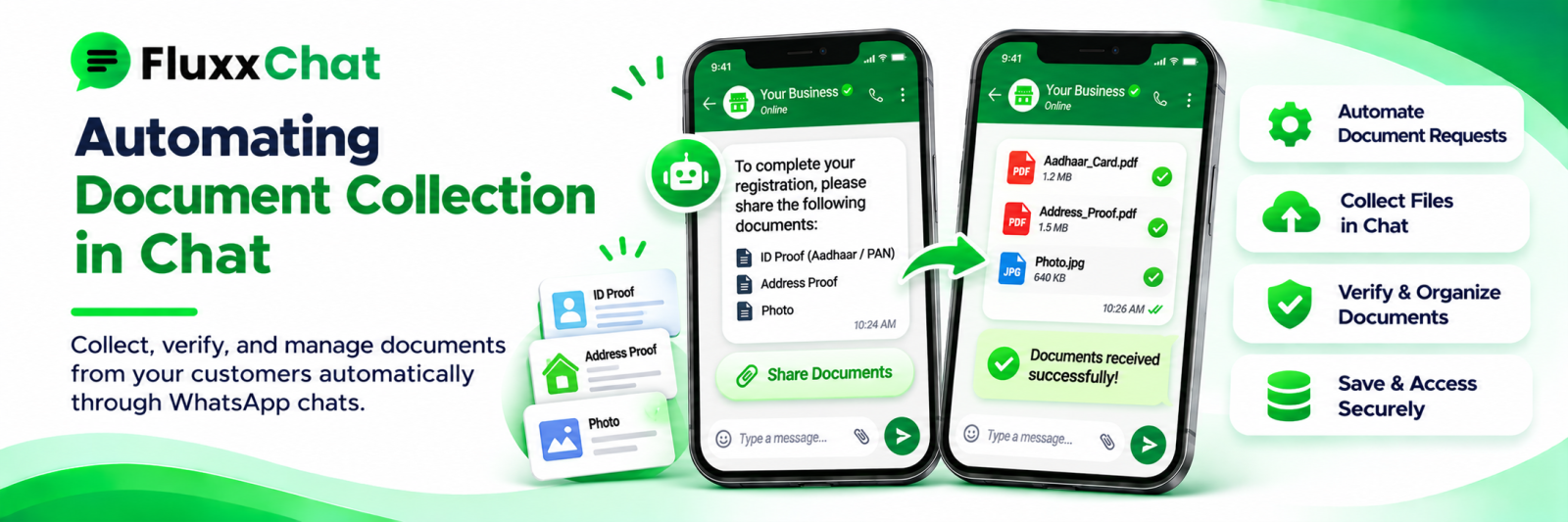
Hi [Name], to proceed with [service] we need: 1. [Document] 2. [Document] 3. [Document]
You can send photos or PDFs right here. Reply DONE when all are sent, or ask if anything is unclear.
Two details that matter:
• Say the format you accept. Photos are fine for many things and useless for others
• Say why, for anything sensitive. “We need the bank statement to reconcile the sales figures” gets a faster response than a bare demand
Track item by item
Not “documents pending” but which documents are pending.
Document | Status |
Sales register | ✅ Received 10 Nov |
Purchase register | ✅ Received 10 Nov |
Bank statement | ⏳ Pending |
Expense bills | ⏳ Pending |
Then your reminder can be specific:
Hi [Name], we have the sales and purchase registers — thank you. Still waiting on the bank statement and expense bills to complete your [month] filing.
A specific reminder gets a far better response than “please send the pending documents”.
Reminder cadence
When | Message |
Day 2 | Gentle: “Any trouble getting these?” |
Day 5 | Specific list of what is still missing |
Day 8 | Consequence stated plainly: “We need these by [date] to file on time” |
Day 10 | A phone call, not a message |
Before deadline | Final notice with the implication |
Automate the first three; escalate to a human for the rest. The consequence must be real and stated without drama: “if we receive them after [date] we cannot guarantee filing by the due date”.
Validate what arrives
A blurred photograph of a document is worse than no document, because someone discovers it two days later.
Check at receipt:
• Is it readable?
• Is it the right document?
• Is it complete — all pages?
• Is it current — within the required period?
• Is it the right format?
Reply immediately if it fails:
Thanks! The bank statement photo is a bit blurred on page 2. Could you resend that page, or share the PDF from your bank app?
Immediate rejection is far better than discovering it at filing time.
Guide customers to better submissions
Small instructions remove most bad submissions:
• “Place it on a flat surface in good light”
• “Please send the PDF from your bank app rather than a photo”
• “All pages, including the blank ones”
• “Make sure the numbers are readable”
A short example image showing a good and a bad photo works better than written instructions.
Store it securely, not in chat
The most important rule. Documents received on WhatsApp should not live in WhatsApp.
• Move to controlled storage, filed against the customer and the matter
• Named consistently: ABCIndustries-BankStatement-Oct2026.pdf
• Access restricted by role
• Audit trail of who viewed or downloaded
• Deleted from chat and from staff phones after transfer
A staff member’s phone gallery full of customers’ identity documents is a serious exposure and a common one.
Retention and deletion
• Keep only as long as you need it, or as long as the law requires
• Confirm statutory retention periods with your CA or legal adviser
• Delete after the period, automatically where possible
• Tell customers how long you keep their documents
• Never keep identity documents longer than necessary
Under the DPDP framework these obligations are real. See our data and consent guide.
Be careful what you ask for
Collect the minimum.
• Do you need the full ID document, or just a verification?
• Do you need to keep it, or only to see it?
• Can you mask part of an identity number?
• Is this document actually required, or is it on the list from habit?
Every document you hold is a risk you carry. Many checklists contain items nobody has needed in years.
Be especially careful with: identity documents, financial statements, health records, documents relating to children.
Measure
Metric | Why |
Average days from request to complete submission | The bottleneck you are fixing |
Documents rejected on quality | Instruction clarity |
Reminders sent per request | Chasing effort |
Matters blocked on documents | Visible workload |
Requests completed without a phone call | Automation value |
Documents collected but never used | Prune the checklist |
That last row is worth running once a year. Checklists accumulate items; nobody removes them.
Frequently asked questions
Is WhatsApp safe for sensitive documents? Transit is encrypted, but the files then sit on devices and in chat history. Move them to controlled storage promptly and delete from chat.
Can we automate the whole collection? Automate the request, the tracking and the reminders. A person should check quality and handle anything unusual.
What speeds up collection most? Sending the complete list at once, with a clear reason and a stated deadline, then specific reminders naming only what is missing.
Ready to automate WhatsApp and Instagram?
Start with FluxxChat: campaigns, chatbot and a shared inbox for your team.
Get started free