In this article
- What the quality rating is
- Messaging limits and tiers
- The things that get numbers restricted
- 1. Messaging people who did not opt in
- 2. Too much, too often
- 3. Irrelevant content
- 4. No easy way to stop
- 5. Misleading content
- 6. Sending to inactive numbers
- How to protect it
- If your rating drops
- Yellow
- Red
- If the number is restricted or banned
- A sensible sending discipline
- Monitoring
- Frequently asked questions
Businesses moving to WhatsApp Business API usually focus on features and message costs. The thing that will actually determine whether the channel works for you long term is your quality rating, and almost nobody thinks about it until it drops.
A number with a poor rating cannot reach its customers. At that point your templates, your flows and your opt-in list are worth very little.
What the quality rating is
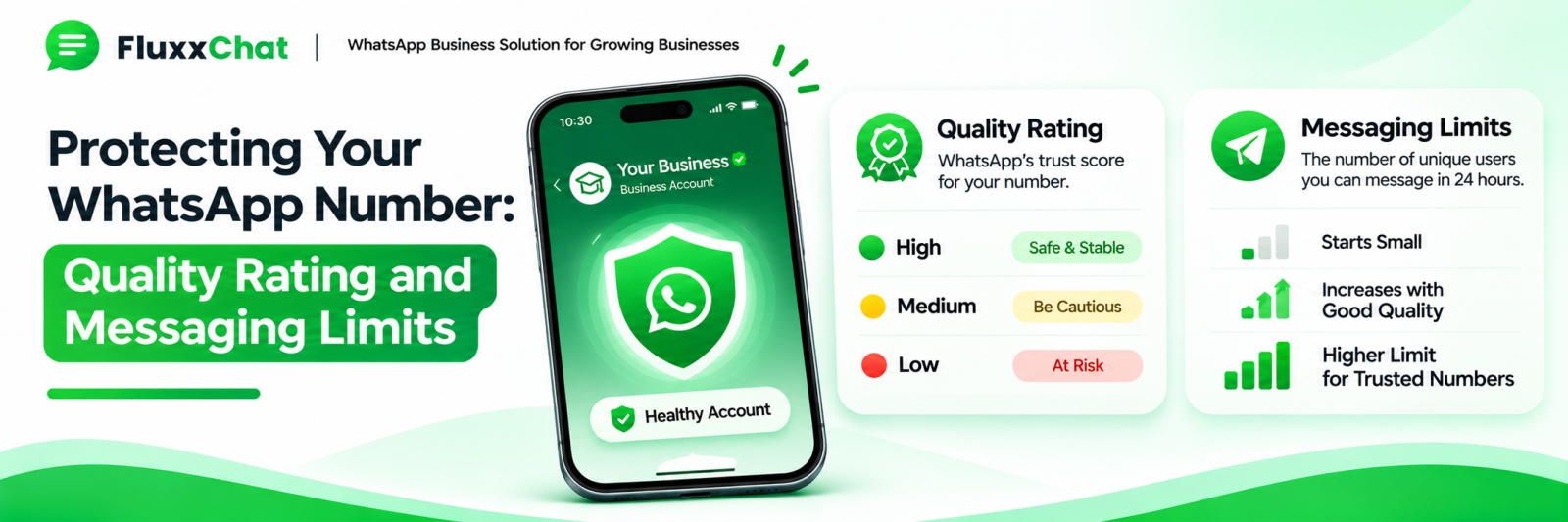
Meta assigns every WhatsApp number a quality rating based on how recipients respond to your messages over a rolling period.
Rating | Status | What it means |
Green | High | Healthy. No action needed. |
Yellow | Medium | Warning. Recent negative feedback. |
Red | Low | At risk. Restrictions likely if it continues. |
You can see your rating in your Business Manager, and a good platform surfaces it for you.
What drives it down
• Customers blocking your number
• Customers tapping report
• Low engagement — messages delivered and read but never acted on
• High volumes of messages to people who did not expect them
What drives it up
• Customers replying
• Low block and report rates
• Messages that are relevant to the recipient
• Time passing without negative signals
Messaging limits and tiers
Separately from quality, your number has a messaging limit — the number of unique customers you can start a conversation with in a rolling 24-hour period.
New numbers start at a low tier and can be upgraded as you send consistently with a good quality rating. The tiers typically progress through 250, 1,000, 10,000, 100,000 and unlimited unique customers per day.
| What it means for you |
Starting out | You cannot broadcast to 5,000 people on day one |
Scaling up | Tier increases come from consistent, good-quality sending |
Dropping down | A red quality rating can reduce your tier |
The practical implication: build up. If you have a list of 8,000 and you are on a low tier, you cannot reach them all at once, and attempting to by any workaround is worse than waiting.
Messages customers send you, and your replies within the 24-hour window, do not count against this limit. It applies to business-initiated conversations.
The things that get numbers restricted
1. Messaging people who did not opt in
The root cause of most problems. A purchased list, a scraped directory, numbers collected for one purpose and used for another — all of these produce blocks at a rate that damages your rating quickly.
2. Too much, too often
Even opted-in customers block businesses that message them weekly with promotions. Marketing frequency is the second most common cause.
3. Irrelevant content
A customer who bought school uniforms receiving messages about industrial equipment will block you. Segmentation is not a refinement; it is protection.
4. No easy way to stop
If opting out is difficult or not offered, people block instead. A block is far more damaging to you than an opt-out.
5. Misleading content
Offers that are not real, urgency that is manufactured, claims that do not hold. Customers report these.
6. Sending to inactive numbers
Numbers that no longer exist or never engage produce failed deliveries and poor engagement signals.
How to protect it
Collect opt-in properly, and keep the record.
Valid opt-in: a tick box at checkout, a form where they entered their number for this purpose, a message they sent you first, a click-to-WhatsApp ad they tapped, written consent.
Keep a record of when and how each person opted in. If your account is ever reviewed, this is what matters.
Put an opt-out in every marketing message.
Reply STOP to unsubscribe.
One line. It converts potential blocks into opt-outs, which do not harm you.
Honour opt-outs immediately. Within minutes, not at the end of the month. Then confirm it:
You will not receive further promotional messages. We will still send order updates. Thanks.
Segment before every broadcast. Ask: would this specific person find this specific message useful? If you cannot answer yes, they should not be on this send.
Keep marketing frequency low. Two to four marketing broadcasts a month is a sensible ceiling for most businesses. Utility messages — order confirmations, reminders — can be more frequent because they are expected and wanted.
Clean the list. Review engagement every few months. Numbers that have never replied to anything across many messages should come off. They cost money and they drag your signals down.
Reply fast. Engagement is a positive signal. A business that answers quickly gets replies, and replies are good for your rating.
If your rating drops
Yellow
Act now rather than waiting.
1. Stop all marketing broadcasts immediately. Utility messages can continue.
2. Look at what you sent in the last week. Which campaign preceded the drop?
3. Check the list used. Were these all genuinely opted in?
4. Review the content. Was it relevant to everyone who received it?
5. Wait. Ratings recover over time when negative signals stop.
Usually it recovers within days to a couple of weeks if you stop the cause.
Red
More serious. Restrictions may already apply.
1. Stop all business-initiated messaging. Respond only to incoming conversations.
2. Audit your entire list and remove anyone whose opt-in you cannot evidence.
3. Review every active template — pause any that are performing badly.
4. Give it time. Weeks, not days.
5. Restart slowly — small, well-segmented sends to your most engaged customers first.
If the number is restricted or banned
Meta provides an appeal process through Business Manager. Appeal with specifics: how you collect opt-in, what you send, what you have changed. A vague appeal rarely succeeds.
Prevention is much easier than appeal. Treat yellow as the warning it is.
A sensible sending discipline
Rule | Why |
Only message people who opted in | The root of everything |
Opt-out line in every marketing message | Converts blocks into opt-outs |
Honour opt-outs within minutes | Prevents blocks |
Segment every send | Relevance is protection |
Two to four marketing broadcasts a month | Frequency is the second biggest cause |
Clean the list quarterly | Removes dead weight |
Watch the rating weekly | Catch yellow early |
Test with a small segment first | Find a bad message before 5,000 people see it |
That last one is worth doing routinely. Send a new campaign to 200 of your most engaged customers. If the response is poor, you have learned it cheaply.
Monitoring
Check these weekly:
• Quality rating — green, yellow or red
• Messaging tier — and whether you are close to the limit
• Block rate per campaign
• Opt-out rate per campaign
• Reply rate — the positive signal
• Template status — any paused or disabled
A rising opt-out rate is a useful early warning. People usually opt out before they start blocking.
Frequently asked questions
How often is the quality rating updated? It is based on a rolling window of recent activity and updates regularly. Changes in your sending behaviour show up within days.
Does a low rating stop messages entirely? Not immediately. It first reduces your messaging limits. Continued problems can lead to restriction.
Can I move to a new number if mine is restricted? You can register another number, but if the underlying practice does not change the new number will go the same way. Fix the cause.
Do customer-initiated conversations affect the rating? Positively, if you respond well. Replies are a good signal.
Does the green tick protect my rating? No. They are separate. A verified business with poor sending practice still gets a poor rating.
How many blocks is too many? Meta does not publish a threshold. Treat any movement from green to yellow as the signal to change something.
Ready to automate WhatsApp and Instagram?
Start with FluxxChat: campaigns, chatbot and a shared inbox for your team.
Get started free