In this article
- What a template is, and why approval exists
- The categories, and why they matter
- The common rejection reasons
- 1. Wrong category
- 2. Variables at the start or end
- 3. Variables with no sample content
- 4. Too many variables, too little text
- 5. Spelling, grammar and formatting
- 6. Content that breaks policy
- 7. Misleading or exaggerated claims
- 8. Asking for sensitive information
- 9. URL shorteners
- 10. Duplicate or near-duplicate templates
- Templates that pass
- Utility — order confirmation
- Utility — appointment reminder
- Utility — quotation follow-up
- Marketing — honest and specific
- Marketing — re-engagement
- Writing to be approved, first time
- Buttons and footers
- If a template is rejected
- Keeping templates healthy after approval
- Frequently asked questions
You write a message, submit it as a template, and it comes back rejected. Often with a reason so brief it tells you nothing.
Template rejection is routine, and almost always fixable. Here is what Meta is checking, why submissions fail, and how to write one that passes the first time.
What a template is, and why approval exists
Outside the 24-hour customer service window, you can only message a customer using a pre-approved template. Meta reviews each one to make sure businesses are not using WhatsApp for spam.
Every template has:
• A name — internal, lowercase with underscores
• A category — marketing, utility, or authentication
• A language
• A body, with optional variables like {{1}}
• Optional header, footer and buttons
Approval usually takes minutes to a few hours, though it can take up to 24.
The categories, and why they matter
Getting the category right is the single biggest factor in approval.
Category | For | Examples |
Utility | A specific transaction or action the customer took | Order confirmed, out for delivery, appointment reminder, payment receipt, service due |
Marketing | Promotion, offer, announcement, re-engagement | New arrivals, festival offer, we miss you, event invitation |
Authentication | One-time codes only | OTP, login verification |
The rule of thumb: if the message exists because the customer did something specific, it is utility. If it exists because you want to sell something, it is marketing.
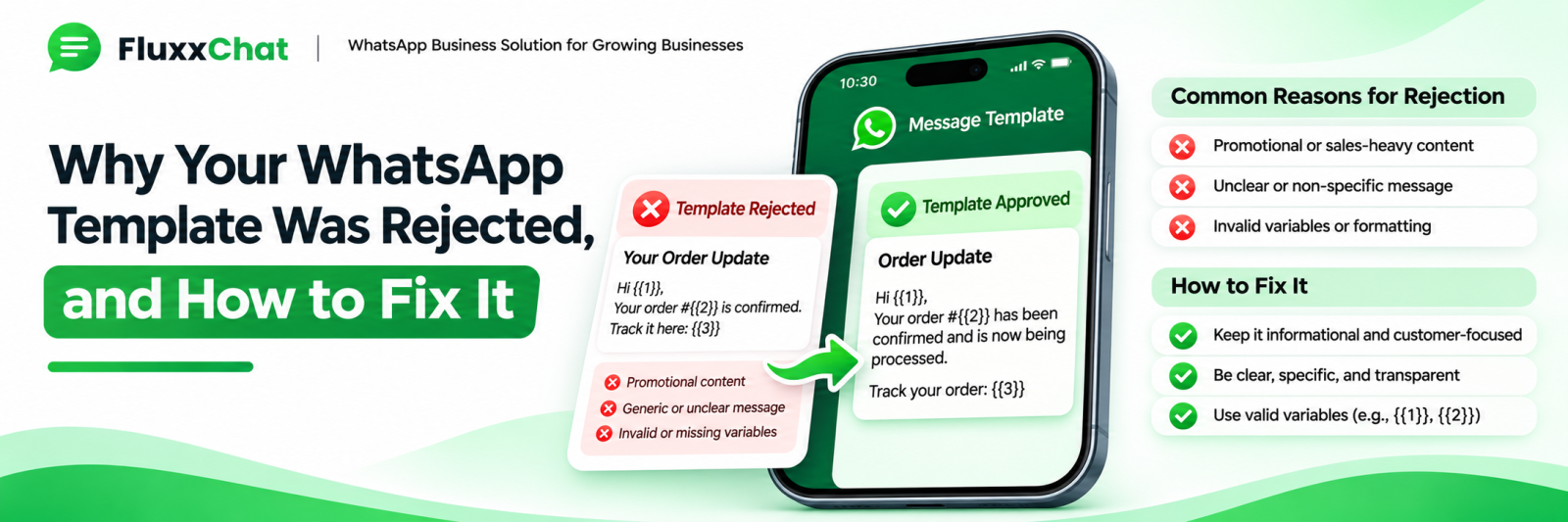
Submitting a promotional message as utility is the most common rejection cause. Meta re-categorises or rejects it, and a pattern of it affects your account standing.
The common rejection reasons
1. Wrong category
Covered above. “Hi, check out our Deepavali offer” is marketing, however you label it.
Fix: resubmit in the correct category.
2. Variables at the start or end
A template cannot begin or end with a variable, and cannot have two variables next to each other.
Rejected: {{1}}, your order is ready.
Approved: Hi {{1}}, your order is ready for collection.
Rejected: Your order {{1}} {{2}} has shipped.
Approved: Your order {{1}} has shipped via {{2}}.
3. Variables with no sample content
When you submit, you must provide example values for every variable so the reviewer can see what the finished message looks like. Missing or nonsense samples get rejected.
Fix: give realistic samples — {{1}} = “Suresh”, {{2}} = “ORD-4821”.
4. Too many variables, too little text
A template that is mostly placeholders looks like it could say anything.
Rejected: {{1}} {{2}} {{3}} {{4}}
Fix: write real sentences with variables inserted into them.
5. Spelling, grammar and formatting
Reviewers reject templates with obvious errors, excessive capitals, excessive emoji, or strange spacing.
Rejected: HELLO!!! 🎉🎉🎉 SPECIAL OFFER ONLY TODAY!!! CLICK NOW!!!
Fix: write it as a person would. Sentence case, normal punctuation, at most one or two emoji.
6. Content that breaks policy
Certain categories are restricted or prohibited on WhatsApp. These include alcohol, tobacco, gambling, weapons, adult content, certain financial and medical products, and anything making unverifiable claims.
Fix: if your sector is restricted, review WhatsApp’s Commerce and Business policies before building a messaging programme around it.
7. Misleading or exaggerated claims
“Guaranteed results”, “100% cure”, “get rich quickly” and similar get rejected.
Fix: state what you actually offer, factually.
8. Asking for sensitive information
Templates must not request passwords, full card numbers, OTPs from other services, or similar.
Fix: direct the customer to a secure page rather than asking in chat.
9. URL shorteners
Links through bit.ly and similar are often rejected because the destination cannot be verified.
Fix: use your own domain. A link on fluxxchat.com is fine.
10. Duplicate or near-duplicate templates
Submitting several templates with almost identical content gets them rejected.
Fix: use variables to handle variation within one template instead of creating many.
Templates that pass
Utility — order confirmation
Hi {{1}}, thank you for your order. Your order {{2}} has been confirmed and will be dispatched within {{3}} working days. We will share tracking details once it ships.
Clean, specific, transactional, variables embedded in sentences.
Utility — appointment reminder
Hi {{1}}, this is a reminder of your appointment at {{2}} on {{3}} at {{4}}. Reply RESCHEDULE if you need a different time.
Ends with a reply prompt, which opens the free window.
Utility — quotation follow-up
Hi {{1}}, we sent you a quotation for {{2}} on {{3}}. Let us know if you would like any changes or have questions about it.
Marketing — honest and specific
Hi {{1}}, our Aadi offer is now on — {{2}} on selected items until {{3}}. Reply OFFER and we will send you the full list.
Specific offer, clear end date, reply prompt. No capitals, no exclamation marks, no exaggeration.
Marketing — re-engagement
Hi {{1}}, it has been a while since your last service with us. Your {{2}} is due for a check-up. Reply BOOK and we will arrange a convenient time.
Writing to be approved, first time
Do | Do not |
Write in complete sentences | Use fragments and placeholders |
Put variables in the middle | Start or end with one |
Give realistic variable samples | Leave samples empty or write “test” |
Pick the correct category | Label marketing as utility |
Use your own domain for links | Use URL shorteners |
Add a clear reply instruction | Leave the customer with nothing to do |
Keep emoji to one or two | Fill the message with them |
State facts | Make guarantees you cannot prove |
Buttons and footers
Quick reply buttons — up to three short options. These are useful because a tap opens the 24-hour window.
Call-to-action buttons — a phone number or a URL.
Footers — a short line at the bottom, commonly used for the opt-out instruction: “Reply STOP to unsubscribe.”
Including an opt-out line in marketing templates is good practice. It reduces blocks, and blocks are what damage your quality rating.
If a template is rejected
1. Read the reason given. It is brief but usually points at the category or a policy area.
2. Check the category first. This is the most common cause.
3. Check variable placement and samples.
4. Reread the text as a stranger. Does it sound like spam?
5. Edit and resubmit. You can usually resubmit an edited template immediately.
6. If it fails twice, rewrite it substantially rather than making small changes.
Repeated rejections of the same template are not useful. Change the approach, not the punctuation.
Keeping templates healthy after approval
Approval is not permanent. Templates have their own quality rating, based on how customers respond.
• A template that gets blocked or reported frequently can be paused or disabled
• Too many disabled templates affects your whole account
Protect them by sending only to people who opted in, keeping frequency reasonable, and making the content genuinely relevant to who receives it.
Frequently asked questions
How long does approval take? Usually minutes to a few hours. Meta allows up to 24 hours.
Can I edit an approved template? Yes, within limits, and edits go back for review. Frequent edits are limited, so get it right rather than iterating live.
How many templates can I have? There are account-level limits, but most businesses need far fewer than they are allowed. Ten to twenty well-written templates covers most operations.
Can I have the same template in Tamil and English? Yes. Submit each language version separately under the same template name.
My template was approved but is not sending. Check: does the recipient have valid opt-in, is your wallet funded, is your number’s quality rating healthy, and has the template been paused.
Does a rejected template affect my account? A single rejection, no. A repeated pattern of policy-violating submissions can affect account standing.
Ready to automate WhatsApp and Instagram?
Start with FluxxChat: campaigns, chatbot and a shared inbox for your team.
Get started free